

Description
Cyborg Security is a leading provider of advanced threat hunting solutions, with a mission to empower organizations with cutting-edge technology and collaborative tools to proactively detect and respond to cyber threats. Cyborg Security's flagship offering, the HUNTER Platform, combines powerful analytics, curated threat hunting content, and comprehensive hunt management capabilities to create a dynamic ecosystem for effective threat hunting operations.
Follow the steps to gain access to Cyborg Security's Community and setup the 'Open in Tool' capabilities in the HUNTER Platform.
- Declared status
- 1
- Declared author / publisher
- Cyborg Security
Declared sources
Metadata from the source file. No dependencies inferred from KQL.
Data types
Declared permissions
read and write permissions on the workspace are required.
Workspace
Workspace
Connector instructions
Content published in the repository. Refer to the original file for all parameters.
Use the following link to find your Azure Tentant ID <a href="https://learn.microsoft.com/en-us/azure/active-directory/fundamentals/how-to-find-tenant">How to find your Azure Active Directory tenant ID</a>
ResourceGroupName & WorkspaceName
WorkspaceID
1. Sign up for Cyborg Security's HUNTER Community Account
Cyborg Security offers Community Memebers access to a subset of the Emerging Threat Collections and hunt packages.
Create a Free Commuinity Account to get access to Cyborg Security's Hunt Packages: [Sign Up Now!](https://www.cyborgsecurity.com/user-account-creation/)
2. Configure the Open in Tool Feature
1. Navigate to the [Environment](https://hunter.cyborgsecurity.io/environment) section of the HUNTER Platform.
2. Fill in te **Root URI** of your environment in the section labeled **Microsoft Sentinel**. Replace the <bolded items> with the IDs and Names of your Subscription, Resource Groups and Workspaces.
https[]()://portal.azure.com#@**AzureTenantID**/blade/Microsoft_OperationsManagementSuite_Workspace/Logs.ReactView/resourceId/%2Fsubscriptions%2F**AzureSubscriptionID**%2Fresourcegroups%2F**ResourceGroupName**%2Fproviders%2Fmicrosoft.operationalinsights%2Fworkspaces%2F<**WorkspaceName**>/
3. Click **Save**.
3. Execute a HUNTER hunt pacakge in Microsoft Sentinel
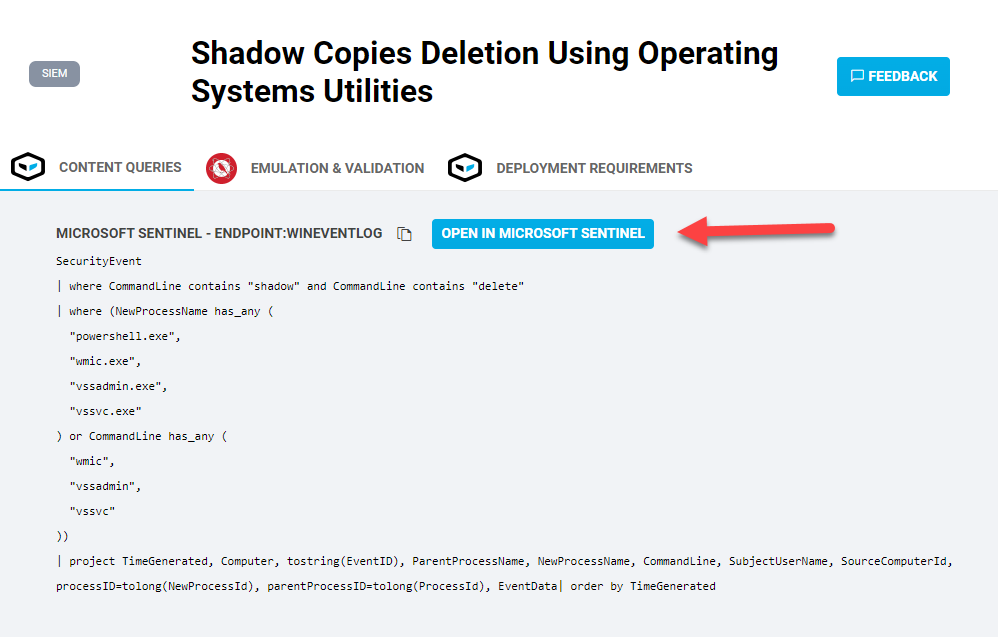
Identify a Cyborg Security HUNTER hunt package to deploy and use the **Open In Tool** button to quickly open Microsoft Sentinel and stage the hunting content.
Related content
Links established from declared identifiers and solution manifests.
Source provenance
GitHubDisplayed values come from files in Azure/Azure-Sentinel. They describe the published template, not your workspace configuration.
- Commit
629d1d3↗- Source identifier
CyborgSecurity_HUNTER
GSTEP / CATALOG TRACKING
Added to catalog : 16 Sept 2026 · 05:49 UTC
Last change observed : 16 Sept 2026 · 05:49 UTC