

Description
Cyborg Security is a leading provider of advanced threat hunting solutions, with a mission to empower organizations with cutting-edge technology and collaborative tools to proactively detect and respond to cyber threats. Cyborg Security's flagship offering, the HUNTER Platform, combines powerful analytics, curated threat hunting content, and comprehensive hunt management capabilities to create a dynamic ecosystem for effective threat hunting operations.
Follow the steps to gain access to Cyborg Security's Community and setup the 'Open in Tool' capabilities in the HUNTER Platform.
- Statut déclaré
- 1
- Auteur / éditeur déclaré
- Cyborg Security
Sources déclarées
Métadonnées du fichier source. Aucune dépendance déduite du KQL.
Types de données
Permissions déclarées
read and write permissions on the workspace are required.
Workspace
Workspace
Instructions du connecteur
Contenu publié dans le dépôt. Consultez le fichier original pour l’ensemble des paramètres.
Use the following link to find your Azure Tentant ID <a href="https://learn.microsoft.com/en-us/azure/active-directory/fundamentals/how-to-find-tenant">How to find your Azure Active Directory tenant ID</a>
ResourceGroupName & WorkspaceName
WorkspaceID
1. Sign up for Cyborg Security's HUNTER Community Account
Cyborg Security offers Community Memebers access to a subset of the Emerging Threat Collections and hunt packages.
Create a Free Commuinity Account to get access to Cyborg Security's Hunt Packages: [Sign Up Now!](https://www.cyborgsecurity.com/user-account-creation/)
2. Configure the Open in Tool Feature
1. Navigate to the [Environment](https://hunter.cyborgsecurity.io/environment) section of the HUNTER Platform.
2. Fill in te **Root URI** of your environment in the section labeled **Microsoft Sentinel**. Replace the <bolded items> with the IDs and Names of your Subscription, Resource Groups and Workspaces.
https[]()://portal.azure.com#@**AzureTenantID**/blade/Microsoft_OperationsManagementSuite_Workspace/Logs.ReactView/resourceId/%2Fsubscriptions%2F**AzureSubscriptionID**%2Fresourcegroups%2F**ResourceGroupName**%2Fproviders%2Fmicrosoft.operationalinsights%2Fworkspaces%2F<**WorkspaceName**>/
3. Click **Save**.
3. Execute a HUNTER hunt pacakge in Microsoft Sentinel
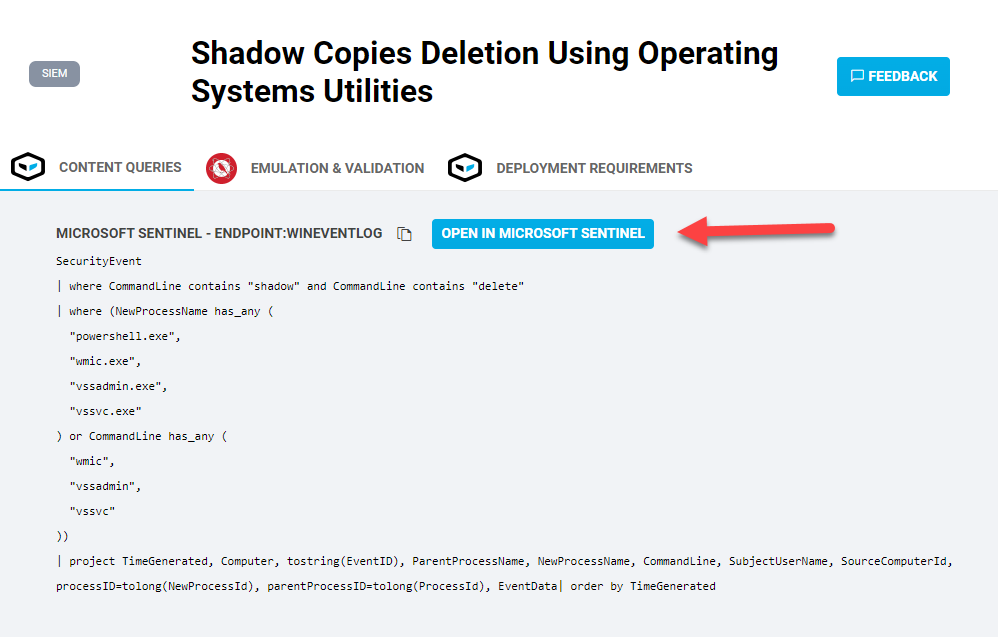
Identify a Cyborg Security HUNTER hunt package to deploy and use the **Open In Tool** button to quickly open Microsoft Sentinel and stage the hunting content.
Contenus associés
Liens établis à partir des identifiants déclarés et des manifests des solutions.
Traçabilité de la source
GitHubLes valeurs affichées proviennent des fichiers du dépôt Azure/Azure-Sentinel. Elles décrivent le modèle publié, pas la configuration de votre workspace.
- Commit
629d1d3↗- Identifiant source
CyborgSecurity_HUNTER
GSTEP / SUIVI DU CATALOGUE
Ajouté au catalogue : 16 sept. 2026 · 05:49 UTC
Dernier changement observé : 16 sept. 2026 · 05:49 UTC